AN INTERRUPTION-REDUCTION TOOL

Work from home.
Without the constant interruptions.

Presence automatically tells the people around you when it’s a good time to come in—without showing them your calendar or private details.

◆ Set it up once◆ Updates automatically◆ Communication content stays private

JOIN THE FREE BETA

Try Presence with the people who interrupt you most.

No dedicated tablet required. Start with the browser you already have and connect only the services you choose.

Free during beta · About 3 minutes to set up · No credit card
Presence2 calendars connected
CURRENT STATUSIn a Meeting

Please do not disturb

Available at 3:30 PM
MANUAL OVERRIDESet your presence
AvailableFocusOn a Call🔥 Dumpster Fire

ONE CLEAR ANSWER

People stop guessing.
Your work keeps moving.

Presence reflects what is actually happening—not only what was scheduled. Calendars, supported meetings and calls, work hours, and quick updates become one calm status for family, coworkers, and reception.

Any modern browserTablet optionalPrivate by design
Every 2 minutesMicrosoft reports that employees using Microsoft 365 are interrupted by a meeting, email, or notification about every two minutes during core work hours.Read the research ↗

INTERRUPTIONS ADD UP

The interruption usually starts with a reasonable question.

“Can I grab you for a second?”“Are you free?”“Can you take this call?”

Each question may be small. The context switch is not. Presence gives people the answer before they have to interrupt.

One clear answer for

Home officesOffice doorsReception desksRemote teamsSchoolsFacilitiesStudiosFamilies

PRESENCE WHEREVER WORK HAPPENS

Built for the people
on both sides of the door.

Start with the problem Presence can solve for you.

SEE PRESENCE IN ACTION

One clear signal.
Wherever work happens.

See how Presence brings calendars, meetings, calls, locations, shared views, and office displays together without sharing the private details behind them.

WHAT PRESENCE DOES

Set it up.
Then get back to work.

Presence is not another status you have to remember to manage. Connect the services you already use, choose where your status appears, and let Presence keep the answer current.

ONE CLEAR ANSWER · AUTOMATICALLY

Your tools provide a signal. Presence provides the answer.

Calendars, meeting services, supported calls, a privately chosen Focus App, working hours, and optional manual updates can contribute limited availability signals. Presence translates them into one simple status.

31 Calendars Meetings Calls + VoIP Focus App Work hours Places Quick update
LIVE STATUSIn a Meeting

Please do not disturb

CALLS THAT WERE NEVER ON THE CALENDAR

Unplanned work still counts.

The optional Mac companion receives only whether a connected iPhone call is active. Teams, Zoom, Webex, Google Meet, Twilio, and compatible VoIP setups can provide simple activity signals without exposing who is calling or what is being said.

CURRENT STATUSOn a Call

Check back shortly

Private by design

Meeting titles stay hidden, account secrets are encrypted, and precise places are never shown.

Status in your own words

Use the built-in personalities or create up to five custom statuses with your own name, message, color, and duration. Each one stays safely tied to a core Presence behavior.

Clear at every door

Use any tablet, browser, spare screen, e-ink-style reader, or TRMNL display—with screen-awake support on compatible Android browsers.

WORKS WITH YOUR DAY

Your calendar is only
one part of the story.

Connect only what helps Presence answer whether now is a good time. Every connection is optional and under your control.

CALENDARSAvailable

Scheduled availability

Google Calendar, Outlook, Microsoft 365, iCloud, private ICS feeds, and multiple calendar accounts.

  • Google Calendar
  • Outlook + Microsoft 365
  • iCloud + ICS feeds
MEETINGSAvailable + beta

What is happening now

Supported meeting services can provide a simple active or inactive signal—even when the meeting was never scheduled.

  • Microsoft Teams
  • Zoom + Webex
  • Google Meet via Chrome
RECORDING + STREAMINGOBS live · Chrome beta

Quiet when the production is live

Presence now detects when OBS starts recording or streaming on a connected Mac. The Chrome beta adds the same automatic awareness to YouTube Live and supported browser studios—all without accessing the production itself.

FOCUS APPMac beta

Focus that starts itself

Choose one Mac app and a 1, 5, or 10-minute sensitivity. When it stays in front long enough, Presence can automatically show Focus.

  • One user-chosen Focus App
  • Simple on/off toggle
  • No documents, window titles, or usage history
AMAZON ALEXALive · Amazon certified

Let your status set the room

Live Presence status changes can now trigger the Alexa routines you choose for lights, plugs, announcements, and office scenes.

QUICK CONTROLAvailable

Easy when plans change

Make a temporary status change, or save custom wording such as Editing while Presence safely treats it like Focus behind the scenes.

  • Up to five reusable custom statuses
  • Your label, message, color, and duration
  • Core behavior preserved for Knock, Alexa, and reporting

No microphones. No recordings. No email reading. Presence receives only the limited status signals needed from the services you choose.

INTERACTIVE EXAMPLE

See a workday
become one signal.

Choose an example moment and watch Presence translate it into a simple, privacy-safe status. No real calendar is connected.

G
Example work calendarTuesday · Demo content
Read only
LIVE STATUS
In a Meeting

Please do not disturb

Calendar details hidden

FROM HOME OFFICE TO WHOLE OFFICE

Clarity at
every door.

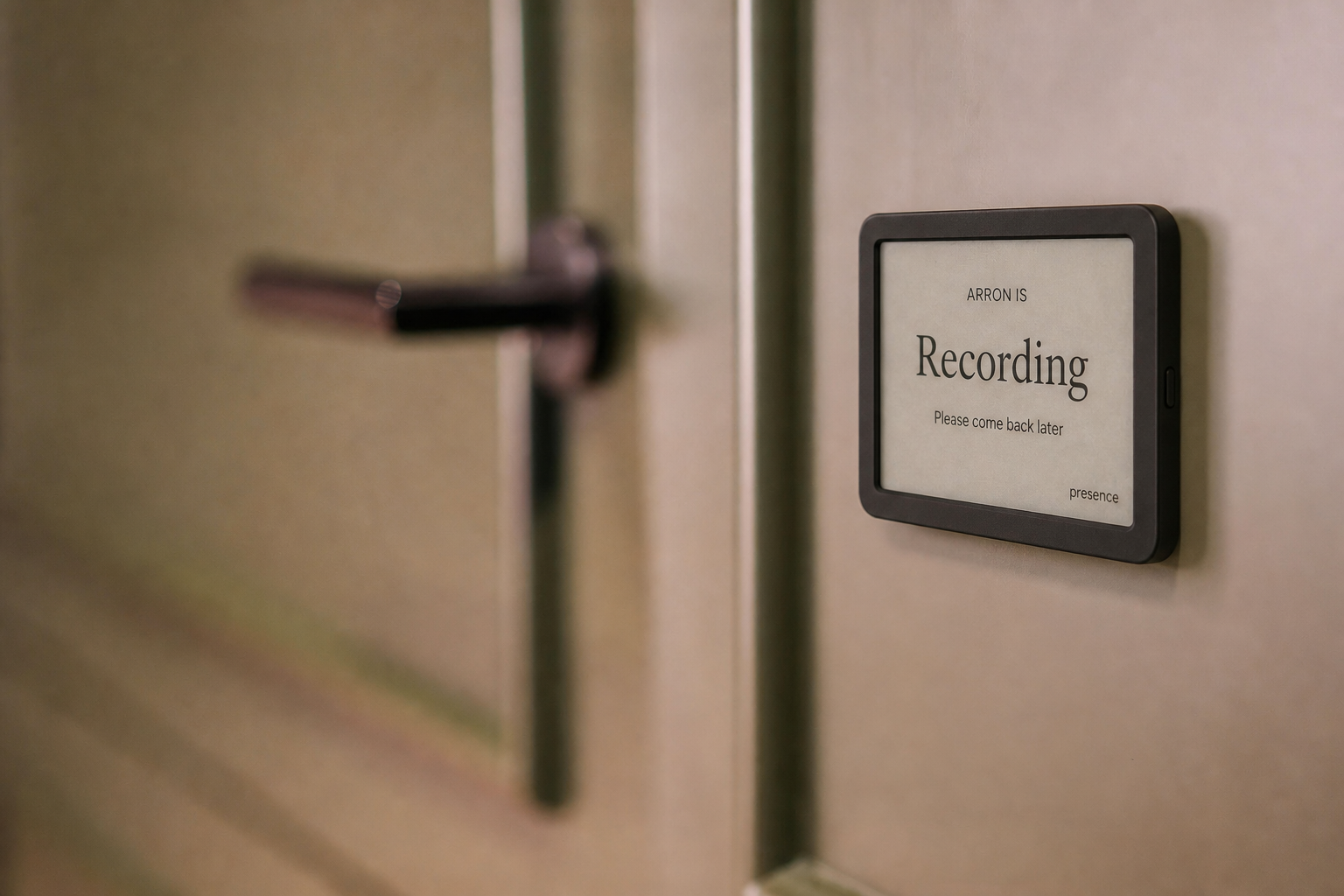
Presence is just as useful in a traditional workplace. Give each office, studio, edit suite, or meeting room a simple live display so coworkers can understand availability before they interrupt.

  • Open the display on any tablet or spare screen
  • Keep compatible Android displays awake while Presence is visible
  • Use the monochrome view on e-ink-style devices
  • Keep meeting titles and calendar details private
  • Let every person control and revoke their own link
Pilot Presence with your team
A realistic e-ink Presence display mounted beside an office door and showing Recording

PRESENCE FOR ORGANIZATIONS

Everyone’s status.
One calm view.

Give receptionists, office managers, and teammates a private directory that answers the question they hear all day: “Is now a good time?”

  • See availability across the whole organization
  • Group people by team or department
  • Show a broad workplace such as Main Office or Remote
  • Keep titles, attendees, and personal calendar details hidden
Join the organization beta
RECEPTION VIEWHartt Creative
Live
CREATIVE TEAM
AH
Arron HarttMain Office
In a MeetingAvailable at 2:30
SD
Steve DirksStudio
AvailableCome on in
MK
Maya KingRemote
On a CallCheck back shortly

Calendar details stay private.

AVAILABILITY—NOT ACTIVITY

Helpful without being invasive.

Presence never listens to calls, records meetings, reads emails, or shares communication content. It answers one question—“Is now a good time?”—while keeping titles, attendees, and precise locations out of shared views.

For organizations, Presence is designed to improve coordination—not measure performance, attendance, or productivity.

Private communication contentStays privateSimple availability status →

WHY I BUILT PRESENCE

Presence has
two meanings.

Working from home gives us the chance to notice life’s smallest moments—while still giving our work the focus it deserves.

Arron spending time outdoors with his wife and son
The family behind Presence.
“Presence came from a simple question: How can I protect focused work without missing the little moments happening just outside my office?”Arron HarttFounder of Presence
01

The small moments matter.

After two years of working from home, some of my favorite moments are the ordinary ones: making lunch, tying my seven-year-old’s shoes, putting on a Band-Aid, or sharing a quick laugh with my wife. They may seem small, but they are a meaningful part of why I love working from home.

02

Clear boundaries protect good work.

Working from home puts me close to the people I love, but being nearby does not always mean I can step away for the little things. When my family can see that I am focused, recording, or in an important call, they do not have to guess—and my coworkers can trust that the work in front of me has my full attention.

Presence is not about working less or being available every minute. It makes the boundary clear, so focused work can stay focused—and the moments between it can still matter.

Do focused work.Make room for the little moments. Be present for both.

SIMPLE BETA PRICING

One calm signal.
One simple plan.

Billing is coming after the beta. Join now to help shape the product before paid subscriptions begin.

Nonprofit program
$0for verified nonprofits

The core Presence plan will always be free for verified nonprofits, regardless of their mission.

  • All Presence Personal features
  • Simple organization verification after beta
  • No advertising or calendar-data sales
Our nonprofit promiseBeta requests are open now.

COMMON QUESTIONS

Helpful answers,
without the fine print.

Presence is designed to be simple to understand before you connect anything.

What calendar information does Presence access?

Presence uses read-only calendar access to calculate whether you are free, busy, or approaching a meeting. Event titles may be evaluated privately for statuses such as Focus or Recording, but titles, attendees, and meeting details are never shown on shared views or displays.

Can I disconnect accounts or revoke a shared link?

Yes. Calendar accounts can be disabled or removed from the dashboard. Public and display links can be disabled or replaced at any time, immediately invalidating the old link.

Is the beta free?

Yes. There is no charge during the current beta. Presence Personal is planned at $5.99 per user per month afterward, with free access planned for verified nonprofit organizations.

Which calendars, meeting apps, and devices work?

Presence supports multiple Google Calendar accounts, Outlook and Microsoft 365, iCloud, and private ICS feeds. Live availability can also come from Teams, Zoom, Webex, Google Meet, iPhone calls through a Mac, and supported VoIP systems. Status can be viewed in any modern browser, on tablets and spare displays, or through the TRMNL-ready feed.

Can a traditional office deploy Presence outside multiple rooms?

Yes. Each person can open their private display link on a tablet, e-ink-style browser, spare monitor, or other web-capable screen outside an office or studio. Every user remains in control of their own calendars and can revoke their display link at any time.

Can reception see everyone’s availability?

Yes. Presence for Organizations includes a private Reception View showing each participating member’s status, department, broad workplace, and expected availability. Members opt in themselves, and calendar titles, attendees, and precise locations are never shown.

How do calls and unscheduled meetings update my status?

The optional Presence Mac companion uses Apple Continuity to notice only whether a nearby iPhone call is active. Twilio and compatible work-phone systems can send the same private call-start and call-end signals. Teams, Zoom, Webex, and the Chrome extension can contribute simple live activity without exposing meeting names, participants, chat, recordings, audio, or video.

Does the Focus App feature monitor what I do?

No. You choose and confirm one Mac application. Presence receives only its name, identifier, and whether it has remained frontmost long enough to trigger Focus. It does not collect window titles, documents, spreadsheets, keystrokes, screenshots, other open apps, time-use history, or productivity scores. You can pause the automation without forgetting the app.

JOIN THE FREE BETA

Protect focus without shutting people out.

Join with just your name and email. If you want, tell us where Presence could help—in your home office, studio, church, nonprofit, or team.

✓ Free during beta✓ No dedicated hardware required✓ Personal setup help
We’ll use this information only to review your beta request and follow up.

Already participating in the beta?

or